
Complex Print Pricing
Create quantity breaks, measurement pricing and structured pricing rules without building hundreds of WooCommerce variations.
PrintFlow Pro helps print shops create quantity-based, measurement-based and attribute-matrix products without fighting standard WooCommerce variations.
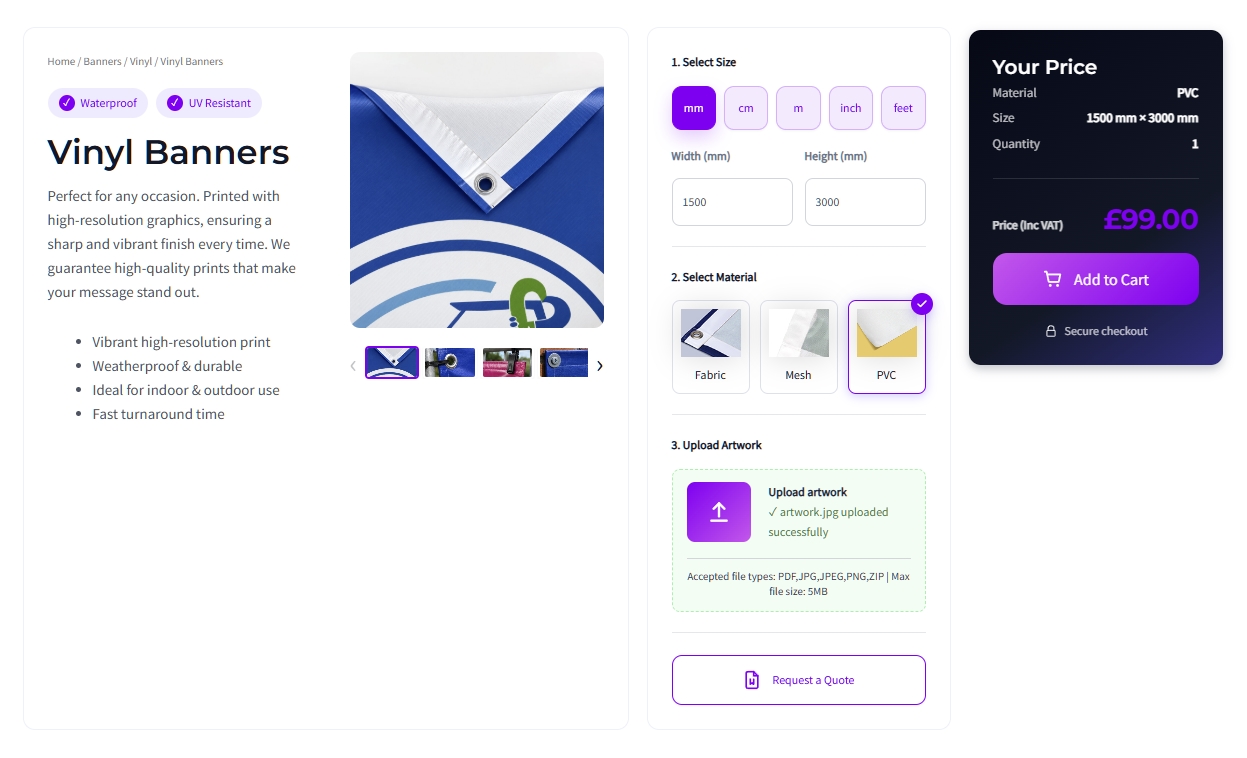
Standard WooCommerce works brilliantly for ordinary products, but print products need more flexibility. PrintFlow Pro adds the pricing, configuration and production workflow that print businesses actually need.
Create quantity breaks, measurement pricing and structured pricing rules without building hundreds of WooCommerce variations.
Sell standard quantities or calculate prices from width, height and area with instant live pricing for your customers.
Collect customer artwork alongside the order and keep the important production information connected to the WooCommerce purchase.
Whether you sell standard print runs, custom-sized products or products with multiple options, PrintFlow Pro gives you the right pricing model for the job.
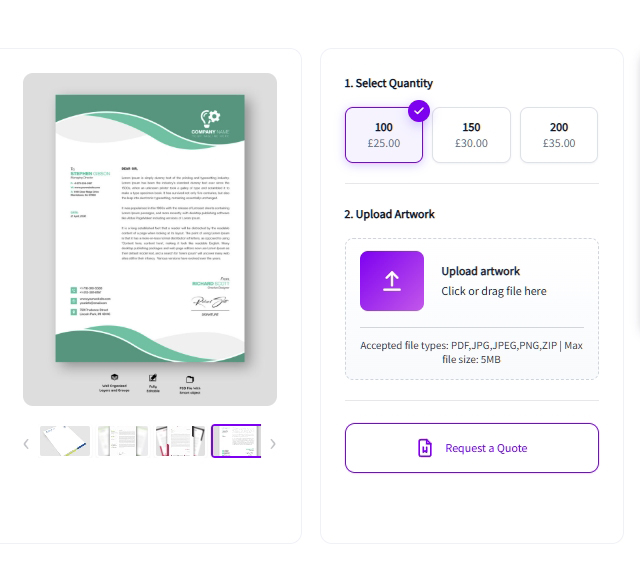
Sell print products using fixed quantity breaks with instant pricing and optional artwork upload.
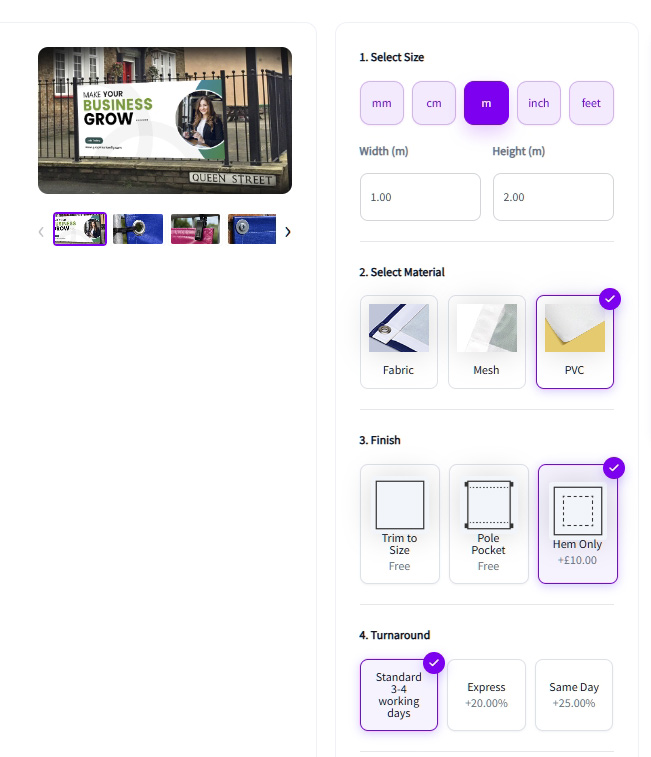
Calculate prices automatically from width, height and area for banners, vinyl and custom-size products.
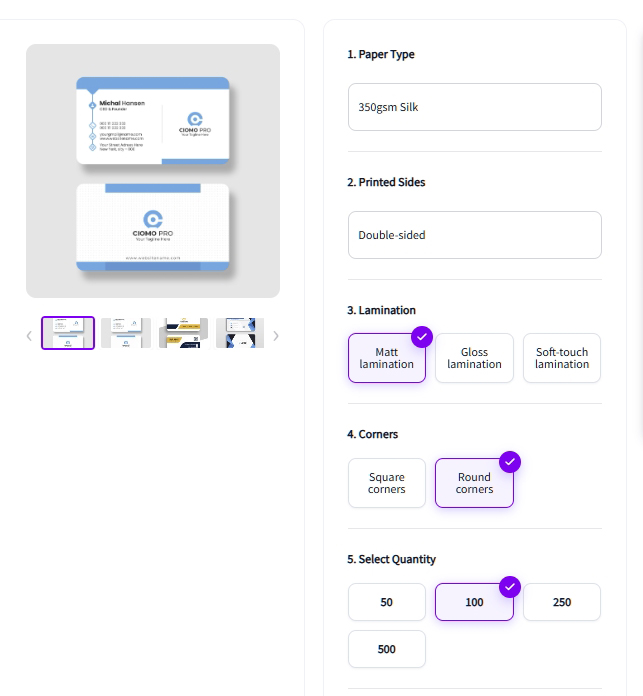
Combine material, finish, printed sides, quantity, turnaround and other attributes into structured pricing.
Build complex print products in four simple steps without creating hundreds of WooCommerce variations.
Choose Quantity, Measurement or Attribute Matrix mode based on how the product should be priced.
Add pricing rules, materials, quantities, measurements and product options.
Link the PrintFlow configuration to your WooCommerce product using Product Builder.
Customers configure their product, see live pricing, upload artwork and place their order.
From pricing and materials to artwork, quotes and customer accounts, PrintFlow Pro brings the important parts of a print workflow together inside WooCommerce.
Connect WooCommerce products to PrintFlow product types, materials and pricing settings.
Learn more →Create reusable materials and assign them only to the products and product types where they belong.
Learn more →Build quantity, area-based, base-plus-area and matrix pricing without relying on endless variations.
Learn more →Let customers upload artwork while configuring their product so files stay connected to the order.
Learn more →Allow customers to request a quote instead of purchasing immediately, using their current product configuration.
Learn more →Give customers one place to view orders, account details, saved quotes and support information.
Learn more →Customers can save configured quotes and return later without starting the product setup again.
Learn more →Create a more polished post-purchase experience with PrintFlow-styled order and customer emails.
Learn more →Give customers a clearer branded confirmation experience after completing their print order.
Learn more →Give customers a clear, guided way to configure print products, see pricing instantly and upload artwork without navigating through complicated WooCommerce variations.
Prices update as customers change quantities, measurements and product options.
Present materials, finishes and configuration choices in a clean step-by-step interface.
Customers can upload their print-ready artwork while configuring the product.
Let customers request a quote using the exact product configuration they have already created.
Build and manage complex print products from a familiar WordPress interface without relying on hundreds of WooCommerce variations.
Manage product types, pricing, materials and product mappings from one structured workflow.
Configure quantity, measurement and matrix-based pricing for different print products.
Create materials once and assign them only where they are relevant.
Manage quote requests, saved quotes and customer activity as part of the same PrintFlow system.
PrintFlow Lite gives you the core tools to start building print products in WooCommerce. Upgrade to Pro when you need more product capacity, quotes and the complete customer workflow.
A capable free version for testing PrintFlow and launching your first WooCommerce print products.
The complete PrintFlow toolkit for print businesses selling a wider range of products through WooCommerce.
Choose the licence that fits your business. Every PrintFlow Pro plan includes the complete plugin, updates and commercial support.
Ideal for a single print business or one WooCommerce print website.
For print businesses running several websites, brands or client installations.
For agencies, developers and print groups managing multiple WooCommerce installations.
All plans include the same PrintFlow Pro features. Licence tiers only change how many websites can activate the plugin.
Here are answers to some of the most common questions about installing, using and upgrading PrintFlow.
Yes. PrintFlow Pro is built specifically for WooCommerce and adds print-focused product configuration, pricing and workflow features on top of it.
Yes. PrintFlow Lite is designed as a starting point, and you can upgrade to Pro when you need additional product capacity and premium features.
No. PrintFlow is designed to be configured through WordPress and WooCommerce without requiring custom code for normal product setup.
Yes. Customers can upload artwork while configuring their product so the file remains associated with the WooCommerce order.
Yes. PrintFlow Pro includes a quote request workflow so customers can submit their configured product for quotation rather than purchasing immediately.
PrintFlow is designed to work within a standard WooCommerce setup. Theme compatibility can vary where a theme heavily overrides WooCommerce product templates.